![]()
A change to the Broking system menu has been done so that the users can change the base colour of the appearance of the system to distinguish mainline systems from alternate or test systems that are accessed.
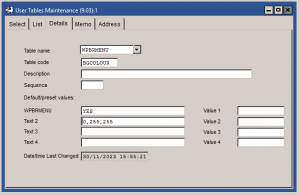
A user table can be set along the form of the below:
TABLE NAME: WPBRMENU
TABLE CODE: BGCOLOUR
Text 1: YES
Text 2: This is the background colour and needs to be set as either an RGB code, for example 0,0,255, or one from our list of default colours where if the colour is typed in.
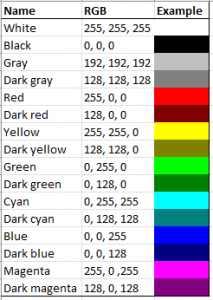
The list of available default colours is as follows:
WHITE, BLACK, GRAY, DARK GRAY, RED, DARK RED, YELLOW, DARK YELLOW, GREEN, DARK GREEN, CYAN, DARK CYAN, BLUE, DARK BLUE, MAGENTA, DARK MAGENTA
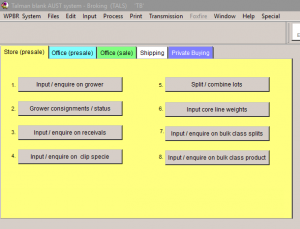
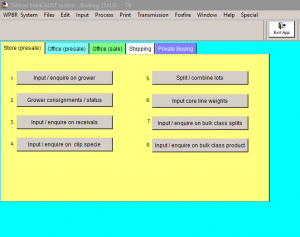
Currently, the default Talman Broking system looks as below (image 1) and then with the colour background (image 2).
This is available now, and any Brokers who would like to utilise this are invited to reach out to Talman support on +61 2 8831 6391 or support@talman.com.au
![]()
Talman has made an update to the existing Check Test Status program. This allows the user to send a request to the AWTA network for the current status of testing for their outstanding wool. Matching on the Internal Reference Number in the Talman system, the check program will produce a report outlining the following points.
1. Client code.
2. Charge code.
3. L/S sample ID.
4. Core sample received.
5. L/S Sample received.
6. TRV matched. Position
7. Core Sample Check test.
8. L/S retuft Required.
9. L/S retuft Received.
10. Core Test Recore Required.
11. Core Test Recore Required.
12. Check for matching lots IRN (LH_refno) Vs weight. If the number does not match, this will be reported.
Please note, to access the reported data from AWTA, you are required to contact AWTA to set this up on their end also.
This is available now, and any users who would like to utilise this are invited to reach out to Talman support on +61 2 8831 6391 or support@talman.com.au
21st August 2023
![]()
Talman has made some changes to the TDS/Emailing function to allow for a different email address for the CC emails to be sent to.
In the MAIL FROM User table, for each of the relevant programs, the email address in Memo 1 is the email address used to send the email.
In the same user table – Memo 2 will use the email address to send the CC of the email. If this field is empty, it will still use the Memo 1 email address to send the CC email.
This is currently available in the following programs:
WPBSHS – Local Invoices
WPINVPRT – Print Invoices
WPINVREV – Print Reversal Invoices
WPCRPRT – Account Sales
WPSHINV – Print Shipping Invoices
WPBASB – Pay Brokers/Dealers
Other programs are being changed and will be available in future releases.
Please contact Talman support via email at support@talman.com.au or call on +61 2 88316391 if you have any questions.
23rd June 2022
![]()
There has been an update made so that Buyers can now create a Payment Advice transmission file to be sent to Brokers.
For BUYERS
The file is automatically created when the Broker Payments are run. The file will need to then be transmitted to the EDI network.
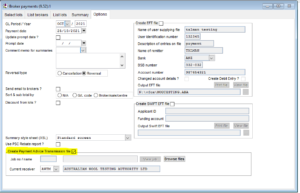
To transmit to the EDI network – run the Transmit Data program and find the Payment Advice transmission job just created.
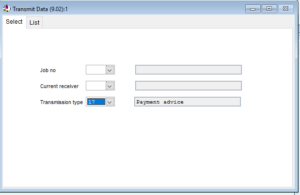
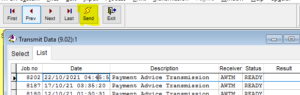
Click on the relevant Job and select SEND
For BROKERS / Receivers of the file
Request the Payment Advices from the EDI network.
Once received – Select the Process button to go through the steps of processing the Payment Advices in.
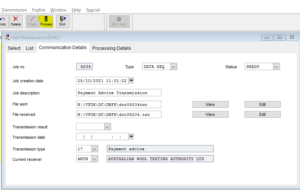
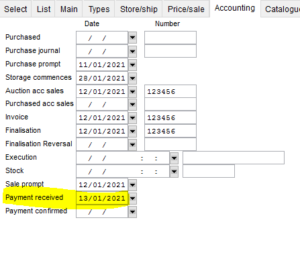
The data will match on the Lot #, Sale/Season/Date and Sale Org. The date “Payment Received” will be updated on the Lot with the date the Payment Advice is updated into your system.
A report is created and can be printed giving a list of the payments received against the lot. If the data has already been updated then it will not overwrite the existing information.
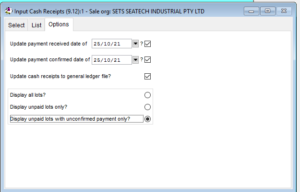
The user can then use the Input Cash Receipts program and select the option to only show those lots from the Sale Org where they are unpaid with unconfirmed payment date only
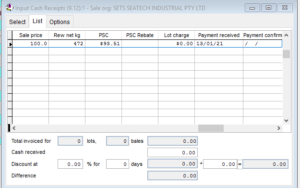
The list will show those lots only. The user will then update the lots accordingly when the payment has been received from the bank records.
If you have any questions about the above, or would like help in setting it up, please let us know by contacting us on phone +61 2 88316391 or email support@talman.com.au
23rd November 2021
![]()
Talman offers Intergration Software for WoolQ and WoolClip
WoolQ
WoolQ is a web portal for the whole wool industry. The WoolQ portal allows wool growers and classers to cooperate on their electronic classer’s specification. The WoolQ eSpeci can be imported into the Talman broker system seamlessly and create lots, bales and the full NWD. Brokers can use their Talman system to send bale weights, valuations, test and sale results back to WoolQ grower accounts, all with existing software. WoolQ also has an online auction system and is planning a bulletin board for sales to the trade at any time. To find out more about WoolQ go to www.woolq.com or contact Nick Potter nick.potter@wool.com 0419 249 066
Woolclip
The primary objective of the program is to pickup and import clip species sent in to WOOLCLIP (AWEX Wool Clip Portal) and import these into your Talman broker system.
The program will be accessed from the special menu, and requires a Licence to be able to run.
A User Name and Password is required to be obtained from AWEX to access the Wool Clip Portal.
If you are interested in this software, then please contact Talman at support@talman.com.au to get a quote.
22nd May 2019
![]()
Talman has made some changes to TDS functionality to allow you to set up different Grower email addresses to be used depending on who the email is being sent to based on the program you are using.
In the Purchase Organisation Maintenance a new Tab has been added called “TDS Settings” – view will look as below – with the following drop down options.
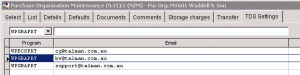
If there is nothing in the drop down list – then these can be set up by creating the following user tables for the relevant TDS programs.
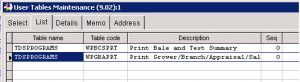
Add into the list for each purchase organisation, an email address that you require to send that report to. i.e. if you require to send the Bale and Test Summary to a different email to the Appraisals report, for this Grower, then these will be entered into the grid, and would look something like this: Note multiple email addresses can be entered as shown below.
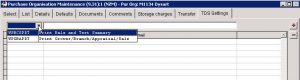
Currently the only two programs available are the above shown in the User Tables. As we develop the other programs an email will be sent to let you know.
If you have any questions about the above, or would like help in setting it up, please let us know by contacting us on phone +61 2 88316391 or email support@talman.com.au
26th October, 2017
![]()
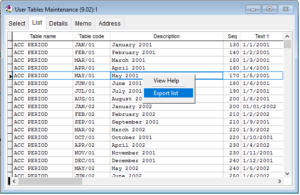
A NEW change has been made to programs as requested by many users. By right clicking in grid of data an option is now available to export to CSV/excel.
16th October 2017
![]()
A good night had by all. Thank you to the organisers.

From Left to Right:
Dave (IT), Cathryn (Support), Kelly (Support), Maria (Accounts) and Ben (Support)
11th September, 2017
![]()
16 March 2017
Talman have been working with AWTA to add a barcode to the Core Test Request/Weight Note, this will assist them with less data entry in their Laboratories, which in turn reduces cost and improves testing turnaround times.
We have created a new report which is a copy of the standard Core Test Request report used in the Australian Broking/Private Buying Systems. This will be made available to all Australian Brokers/Private Buyers in the next release. If you are interested in using this before the next release, please contact us by phone: 02 88316391 or email: support@talman.com.au and we can set it up on your system.
There will be a one-off charge for the Licence of the Barcode Font which will be added into your next 6 monthly fees.
![]()
AWTA Update and changes to the Talman Software (Note: Only Available to Australian Clients via AWTA).
AWTA will be making available Status of Samples in their Laboratories, particularly related to the existence of internal Check Tests, L/S samples requiring retufting and sale lots being recored. Each of these is a type of rework which can delay the availability of the final certificate data.
The early identification of such delays through the “Test Status” information will assist customers to make more informed decisions around lotting and cataloguing for sale deadlines.
Officially this will not be available until the next WIEDPUG Release in July 2017.
Talman has been working with AWTA to get these changes done to their software and they will be available next week in release 2017_1.
If you would like to get the Test Status data from AWTA, please contact John Billing (john.billing@awta.com.au), and he will arrange for this data to become available to you.
1 Feburary 2017